Show posts

This section allows you to view all posts made by this member. Note that you can only see posts made in areas you currently have access to.

Messages - TheCableGuy

1
Resources / Working on a Sprite but need some input.
March 01, 2012, 02:04:49 pm
So, this is my first attempt at a sprite, starting from the head of another sprite and working my way down, trying to visually trace another sprite but I keep running into problems. If it's not the Leggs, I have issues with the arms but once I fix those, it makes everything else off balance. I started on the Top row last night and did the bottom row today so the arms on each do not match.

And this sounds weird, I still think her breasts have too much Definition. She's suppose to be younger then the average sprite but I can't seam to make her look younger without looking like a child.

It's nude so it's in Spoilers, fyi.
Spoiler: ShowHide
2
Is there a way to disable the Clock display in the Script? I can only find the script call to turn it off in the game but would it be possible to turn it off from within the script?
3
Heh, actually I've already found that that very same page in my own search and found it was less then helpful.

My "sound card" is an on-board build into my motherboard so it's not independent but I tried reinstalling the drivers for it but then I remembered why I didn't use it (it doesn't allow my to use my USB Headset.)

But What I can't figure out is why it only effects the RPGmaker programs, nothing else and was worked for years until suddenly today it crapped out on me.

EDIT:
Quote from: Darth Liner on February 26, 2012, 12:35:50 pm
Do you happen to use Avast? Because the odd red border is a feature of Avast! Antivirus when you put a program to open in the sandbox. Open it normally instead and the red border will disappear at least.


Thank you. That was what was causing it. Apparently, Avast updated over the weekend and when it came back up, it put all my RPGmaker programs in auto-sand box mode. I rarely ever use Avast so I tend to forget I have it installed at times and didn't even realized when it updated. But why it'd blocked DirectX from Initializing, I can't say.
4
Well, I haven't changed any of my settings. I had taken a short break from RPGmaker and when I started again, I found it like this.

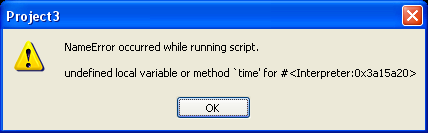
I restarted in Safe Mode and now when I run it, I get an error message "Failed to Initialize DirectX Audio" which is weird cause i know I haven't changed that.

EDIT: I've tried installing a newer DirectX but it's still doing it. Still crashing in normal mode and giving me the error in safe mode.
5
I can't seam to open RPG Maker. Any RPGmaker. XP, VX, 2000, they all seam to do the same thing. I try to open the editer for their system, it'll open for a few secs and then crash. I'd understand if it were a corrupted file in XP but the same thing is with all RPGmaker programs so I know it's something to do with all of them but I wouldn't know what they all share.

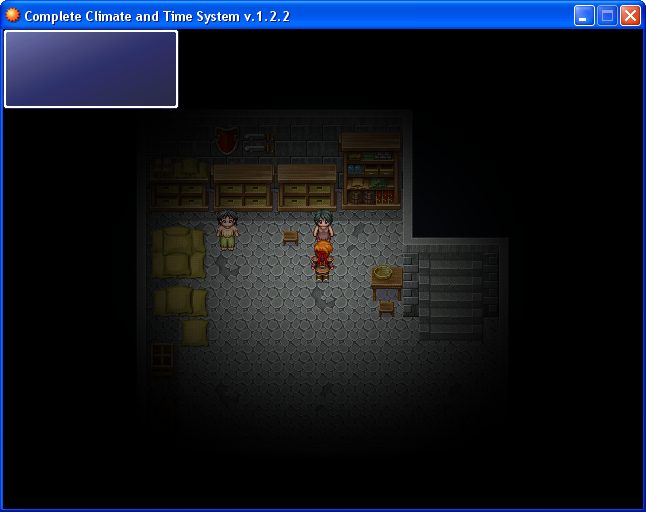
When I do open it, they open with an odd red Border that's not normal and then crash a few secs later, like this.
6
Yes, I save after editing. And I've tried Saving As, Renaming, Copying and moving the file. It always has the same problem.

I've only found one way to fix it and that's to "cut" the image in it's entirety out of the edited image, Close the image (without saving), deleting the image from the directory and out of RPGmakers memory, and then starting a new image in PSP and pasting the cut image into the new one and resaving it under an all new name.

But it's a Hell of a bother just to fix this "Ghosting" that I can't figure out the cause.
7
So, I use Paint Shop Pro 7 for my editing but I'm not 100% on all of it's functions and tool or utilities but I'm comfortable with the 20-25% of it I actually use....

But I keep coming up against this odd problem when using it with RPG Maker XP so I'm looking for anyone with experience with this to help me out.

Sometimes, when I edit a Graphic/Title/Tileset/Image/Window Skin/Etc. and then import the imagine into RPG Maker XP, it'll load fine..... But then I decide I want to edit it so I make my edits and try to Re-import that image but RPGMaker still only has the Original Image "Saved" to it's list. I tried deleting the one in it's Memory and importing again and STILL, it loads the original image Like I can't get rid of it.

If I try to use a Image Viewer other then PSP7 to view the image, it shows me the image unedited but when I load the same file in PSP7 (or even MS Paint) it'll show the image as Edited.

I can't understand what's causing this and It's starting to drive me Totally Batty!
8
The font, yeah. Font problems seam to hit me regularly.

Got that working but would you know why, when using the Script linked on the OP or copied straight from the Demo has no problems running but When i use the configuration tool Provided, I get this Error Message?


Also, is there any suppose for this script using regular am/pm time instead Military time?
9
Could anyone tell me why the Time/Date isn't being displayed on the Digital Display? Would display in neither the Demo nor my project.

10
RMXP Script Database / Re: [XP] Blizz-ABS
February 11, 2012, 03:46:21 pm
Quote from: Boba Fett Link on February 11, 2012, 08:58:54 am
Quote from: TheCableGuy on February 11, 2012, 04:19:23 am
I'm wondering if anyone has a fix for this problem as I ran into the same issue. Blizz ABS seams to disable any text speed altering functions of Ccoa's UMS.


Try Wachunga and ForeverZer0's Multiple Message Windows script. The text scrolling works fine with Blizz ABS, however, the speech balloons don't work with the ABS.

http://forum.chaos-project.com/index.php?topic=5907.0


I tried that one. To be honest, the Demo turned me off of it. And I spent all last night Learning CCOA's and I don't want go through that again.

Even if no one has a fix for it, does anyone know what's causing it?

EDIT: Well, I don't know what's causing it but I did find a Work-around (sort of.) I just reverted to using an earlier version of Blizz-ABS. CCOA' UMS seams to have no issues with BABS version 2.8, in case anyone still having issues with it.
11
RMXP Script Database / Re: [XP] Blizz-ABS
February 11, 2012, 04:19:23 am
Quote from: EBellena on June 17, 2011, 08:02:47 pm
Hey, I seem to be having a compatibility problem with the latest version of Blizz ABS and Ccoa's UMS...

It's doesn't crash the game or anything, so it's not a huge issue, but once I added and configured the ABS in my game, the text in dialogue was instant instead of one letter at a time. It seems to be completely ignoring any pauses. I have UMS above BABS (Placing it below causes some features to fail, along with being instant, so I assume that's where it should be placed) and can't really see what's wrong. I'm not a scripter, so I have no idea what could be causing this. Does anyone know what it is that causes this? As I said, it's not a huge issue, but it seems like it kills the atmosphere a little. Any help is much appreciated!

I hate that my first post involves asking for help, but... Please help?    :P


I'm wondering if anyone has a fix for this problem as I ran into the same issue. Blizz ABS seams to disable any text speed altering functions of Ccoa's UMS.
12
General Discussion / Problem using CCOA's UMS
February 10, 2012, 11:32:59 pm
I Installed CCOA's UMS and found out it disables my Doors, specifically my Transfer Character command. my Door event works right up til the transfer player command but then just cancels it.

Anyone know what's causing this?

Another problem I noticed is that make commands within Events to ignore their assigned order and try to occur all at once, such as flipping switches that I put at the end of the event FIRST.

EDIT: OK. I had an inspiration and Moved the Script up the rest of my scripts and it seamed to fix it.

BUT I'd like to know WHY did this fix it? What caused it in the first place? I'd really like to know for next time something like that happens.
13
VX has it built into it's eventing system but XP is sorely lacking in this capability.

I'm sure that I've seen a Script or Tutorial explaining how to do this, but for the life I me, I've search this site again and again and I can't find it..... Might of saw in on another site awhile ago.

But does anyone know a simple way of doing this? I'd hate to have to asign Corr. for each picture.
14
Resources / Re: Need some feedback...
January 26, 2012, 10:09:59 am
I can see how they would think that seeing that it's clothes appear to be a Skirt and, from the side view, the shirt looks more like a Blouse with the Sleeves looking rather rounded.
15
Resources / Re: Working on an Umbrella For a Sprite
December 26, 2011, 03:19:22 am
You're right there. That's not actually my Spite but rather just one I copied and pasted to show relative size and how it's suppose to look.

Also, I'm using the same image in front and behind so it doesn't look like it's really behind her like it should be. I need to figure out out to "turn it in-side out" so to speak.
16
Resources / Re: Working on an Umbrella For a Sprite
December 25, 2011, 07:31:28 am
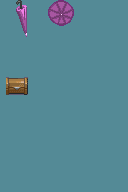
Yeah, one of my worst problems is getting the Shading down. I'm just not that experienced in Paint Shop or graphical editing.  I usually end up taking shortcuts, some of which I'm not too proud of..

This is what I've came up with with as little cheating as I could manage.


17
Resources / Working on an Umbrella For a Sprite
December 24, 2011, 11:34:05 pm
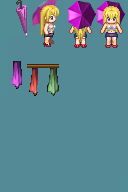
I've gotten as far as this image:


But My Spriting Talents fall short when adding Images with Depth and anything with circles...

So I'm wondering if someone could help out a little or even if someone knows of a Pre-existing Umbrella That I could use and super-impose on to multiple Sprites.

Thanks.