Show posts

This section allows you to view all posts made by this member. Note that you can only see posts made in areas you currently have access to.

Messages - Epherex

1
Quote from: KK20 on May 10, 2017, 02:43:03 am
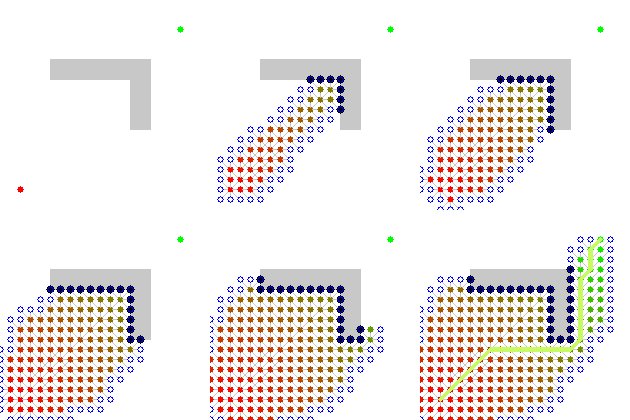
I don't see anything wrong with the code. The simple act of removing @cost from your total node cost just makes the algorithm greedy--it evaluates nodes that look like they are close to finding the path while disregarding optimization (i.e. the shortest path). By putting @cost in, the algorithm first favors nodes that are close to the goal then those that have not been evaluated a lot. At some point, the length of the current path (which might be the correct one) has a larger cost than a node that is close to the beginning.

Wikipedia has a good visualization on what you're experiencing:
Spoiler: ShowHide


That seems to be the case. But try to use Blizz's pathfinder on my demo. Still gets found pretty fast. Isn't it supposed to check the whole map as well? Unless it doesn't use the same algorithm. I didn't take a deep look into its code.
2
Quote from: Blizzard on May 10, 2017, 12:50:17 am
Actually looking up a different path finder might be a good idea since you can figure out how the other one is implemented.
That being said, I vaguely remember that you're supposed to use heuristic cost to the new node from the current plus the movement cost to the current node. I haven't taken a good look at your code yet though.


I based some of my code on other scripts, but I can't see what I'm doing wrong here.

https://www.dropbox.com/s/8gm87ndydj4zkiv/pathfind.exe?dl=0
I uploaded a demo with a script that shows sprites of the nodes on the map (I also set a ridiculous resolution to see better). Green squares are open nodes, red squares are closed ones. From the example on the demo, you can see it checked the whole map. Seems to be because the desired ones actually have higher scores, but on your script the path gets found very fast.
3
I was messing around with pathfinding and I came up with a script that works, but not as expected. It uses the A* algorithm and binary heaps, but for some reason it's really slow on complex paths unless I consider the score of each node as only the heuristic (not considering the cost), and it still works perfectly, and so much faster. Could someone try it out and tell me why this is happening?
To use it, call a script:
PathFinder.new(character, x_target, y_target)

The character must be an actual Game_Character class.
It's still very incomplete because I can't figure out what is going on. Here is the script that considers the score of each node as the movement cost + the heuristic:
class Game_Character
attr_accessor :move_route
attr_accessor :move_route_index
def pos_with_dir(x, y, d)
new_x = x + (d == 6 ? 1 : d == 4 ? -1 : 0)
new_y = y + (d == 2 ? 1 : d == 8 ? -1 : 0)
return [new_x, new_y]
end
end

class Node
attr_reader   :x
attr_reader   :y
attr_reader   :heuristic
attr_accessor :parent
attr_accessor :cost
attr_accessor :open
def initialize(x, y, cost, heuristic, parent = nil)
@open = true
@x, @y, @cost, @heuristic, @visited, @parent = x, y, cost, heuristic, false, parent
end

def score
return @heuristic + @cost
end

def visit
@visited = true
end

def visited?
return @visited
end

def pos
return [@x, @y]
end
end

class PathFinder
attr_accessor :open
attr_accessor :closed
def initialize(char, tx, ty)
@char = char
heuristic = (tx - char.x).abs + (ty - char.y).abs
first_node = Node.new(char.x, char.y, 0, heuristic)
@open = [nil, first_node]
@open_tiles = {[char.x, char.y] => first_node}
@target = Node.new(tx, ty, 0, 0)
@closed = {}
@last_node = nil
find_path
end
 
def find_path
count = 0
while @open.size > 1
#print @open[1].inspect
close(1)
count += 1
if @closed.keys.include?(@target.pos)
@last_node = @closed[@target.pos]
break
end
if count % 200 == 0
Graphics.update
end
end
#print count
backtrack if @last_node != nil
end

def backtrack
list = []
current_node = @last_node
while current_node.parent
difx = current_node.x - current_node.parent.x
dify = current_node.y - current_node.parent.y
move_code = difx == -1 ? 2 : difx == 1 ? 3 : 0
move_code = dify == -1 ? 4 : dify == 1 ? 1 : move_code
command = RPG::MoveCommand.new
command.code = move_code
list.unshift(command)
current_node = current_node.parent
end
route = RPG::MoveRoute.new
route.list = list
route.repeat = false
@char.force_move_route(route)
  end
 
def close(index)
node = @open[index]
node.open = false
remove_heap(index)
@open_tiles.delete([node.x, node.y])
@closed[[node.x, node.y]] = node
expand(node)
end

def expand(node)
return if node.visited?
nodes = []
[2, 4, 6, 8].each do |dir|
new_pos = @char.pos_with_dir(node.x, node.y, dir)
if @char.passable?(new_pos[0], new_pos[1], 0) && !@closed.keys.include?(new_pos)
heuristic = (@target.x - new_pos[0]).abs + (@target.y - new_pos[1]).abs
if @open_tiles.keys.include?(new_pos)
if @open_tiles[new_pos].cost > node.cost + 1
@open_tiles[new_pos].parent = node
@open_tiles[new_pos].cost = node.cost + 1
update_heap(@open_tiles[new_pos])
end
else
nde = Node.new(new_pos[0], new_pos[1], node.cost + 1, heuristic, node)
if nodes[0] != nil && nde.score < nodes[0].score
temp = nodes[0]
nodes[0] = nde
nodes.push(temp)
else
nodes.push(nde)
end
end
end
end
nodes.reverse.each do |nde|
add_heap(nde)
#$scene.spriteset.insert_sprite(nde)
end
node.visit
end
 
def update_heap(item)
position = @open.rindex(item)
while position != 1 && @open[position].score <= @open[position/2].score
temp = @open[position/2]
@open[position/2] = @open[position]
@open[position] = temp
position /= 2
end
end

def add_heap(item)
position = @open.size
@open[position] = item
@open_tiles[item.pos] = item
while position != 1 && @open[position].score <= @open[position/2].score
temp = @open[position/2]
@open[position/2] = @open[position]
@open[position] = temp
position /= 2
end
end

def remove_heap(item)
last = @open[@open.size-1]
@open_tiles.delete(@open[item].pos)
@open[item] = last
@open.delete_at(@open.size-1)
position = item
while position != @open.size-1 && ((@open[position*2] &&
   @open[position].score > @open[position*2].score) ||
   (@open[position*2+1] && @open[position].score >
   @open[position*2+1].score))
if !@open[position*2+1]
score2 = @open[position*2].score + 1
else
score2 = @open[position*2+1].score
end
if @open[position*2].score < score2
temp = @open[position*2]
@open[position*2] = @open[position]
@open[position] = temp
position *= 2
else
temp = @open[position*2+1]
@open[position*2+1] = @open[position]
@open[position] = temp
position = position * 2 + 1
end
end
end
end


To remove the movement cost from the score of each node, remove the "+ @cost" at line 24.
I know there are a lot of good pathfinders out there, but I just want to make my own for experience purposes.
4
Quote from: LiTTleDRAgo on August 18, 2014, 12:04:10 am
try this

#============================================================================
# BlizzABS::AI::Data_Enemy
#----------------------------------------------------------------------------
#  This class processes Map_Enemy AI based upon AI Data, character position
#  and battler status. It includes complete AI control for both actors and
#  enemies.
#============================================================================
class BlizzABS::AI::Data_Enemy
  #--------------------------------------------------------------------------
  # * Alias Listing
  #--------------------------------------------------------------------------
  $@ || alias_method(:memory_invisible,     :memory)
  $@ || alias_method(:view_range_invisible, :view_range)
  #--------------------------------------------------------------------------
  # * player_invisible?
  #--------------------------------------------------------------------------
  def player_invisible?
    return true if $game_switches[1]
    #return true if $game_player.invisible
    # add as much as you want
    return false
  end
  #--------------------------------------------------------------------------
  # * memory
  #--------------------------------------------------------------------------
  def memory(*args)
    return {} if player_invisible?
    memory_invisible(*args)
  end
  #--------------------------------------------------------------------------
  # * view_range
  #--------------------------------------------------------------------------
  def view_range(*args)
    return 0 if player_invisible?
    view_range_invisible(*args)
  end
end


NB : Untested


Thanks man, that's much better! Worked nicely.
6
Quote from: KK20 on August 17, 2014, 02:17:47 am
You're going to have to make a small edit to achieve this. CTRL + SHIFT + F and search for :view_range. Go to the line it takes you to and change it into this:
attr_accessor :view_range

Your script call will look like this:

e = $BlizzABS.get_enemies(TROOP)
e.each{|enemy|
enemy.ai.view_range = 0
}

This will get all the enemies on the map and assign them a vision of zero. This effect goes away as soon as you teleport to a different map. Also note that your enemies will no longer hear or perceive anything since they are based off of the vision's value.


Thank you.
However, I had to change $BlizzABS.get_enemies(TROOP) to $game_map.battlers for it to work (I think this can cause problems). Isn't TROOP supposed to be something else?

EDIT:
I have a problem: When the enemies already saw me and I use the item that turns me invisible, they can still attack me. Isn't there something that can clear their "memory"? This way, the enemies can't go after me even if they saw me before.

EDIT 2:
Got it.
Used this code:
e = $BlizzABS.get_enemies(BlizzABS::TROOP)
e.each{|enemy|
enemy.ai.view_range = 0
enemy.ai.memory = {}
}
7
RMXP Script Database / Re: [XP] Blizz-ABS
August 17, 2014, 12:50:28 am
Hey, I'm pretty sure this bug has already been mentioned here, but I have no time to read all the pages inside this topic.
I have Blizz-ABS 2.86 with Direct Hotkeys on, and if something is stored to the hotkey 2 and I press arrow down, it activates.
Help me please? xD
8
Hey, I'm creating a Blizz-ABS game and I wanted to know if I can, when certain switch is on, set the vision range of all enemies in the map to 0.
I've searched a lot and still can't find a solution.
This would be for an invisibility system, that when the actor uses a certain item, a switch activates and no enemies can see the player.

English is not my native language, so I could have mistaken some words. Sorry for that.
Thanks.
9
RMXP Script Database / Re: [XP] Blizz-ABS
June 22, 2014, 03:00:23 pm
Hey there!
I wonder if I can, instead of using separate sprites for a character attacking, I could just set so the icon of the weapon appears moving above the character sprite when I attack.
There are other systems that do this, but I want this for Blizz-ABS. I suck at pixel art, so this would help me a lot.
10
RMXP Script Database / Re: [XP] RMX-OS
June 03, 2014, 06:43:50 pm
Quote from: Zexion on June 03, 2014, 06:32:09 pm
Going off what blizz said,
First, if using your personal machine to host the server, make sure to host using your IPv4 adress. (type ipconfig in a cmd prompt to get this address)
To connect on the machine that is hosting the server, use the IPv4 adress aswell.
All outside connections must use your public ip address. (I suggest using no-ip so that it covers your address incase it changes.)
Lastly, make sure the ports match, and make sure they are forwarded! Also, don't try connecting with 127.0.0.1 unless the server is hosted on it. Idk why this causes it to freeze for me.


Yes, I already tried using it, but my client still doesn't find the server. All the rest of my PC finds it.
Tried connecting with IPv4 (the server was configured with it too), didn't work.
The ports match, as you can see in the configuration I've posted, and they are fowarded.
11
RMXP Script Database / Re: [XP] RMX-OS
June 03, 2014, 06:07:55 pm
Quote from: Blizzard on June 03, 2014, 06:00:58 pm
What IP are you running the server on? Have you tried using 127.0.0.1 and have you tried using a network adapter's IP? If more than one network adapter is present, make sure you are using the proper IP. Post your server and client configurations as well so we can take a look at them.

Also, try this: Simply download the package again and run it with the server and client without any changes to the configuration (except SQL setup).

Tried localhost, 127.0.0.1, 192.168.0.194 (local network adapter IP), and I don't have more than one network adapter.

Server config
Spoiler: ShowHide
NAME = 'Test Game'
HOST = '127.0.0.1'
PORT = 54269
GAME_VERSION = 1.0

DEBUG_MODE = true
LOG_MESSAGES = true
LOG_ERRORS = true
LOG_ACTIONS = true

MAXIMUM_CONNECTIONS = 50
LOGIN_TIMEOUT = 120
AUTO_RESTART = false
RESTART_TIME = 5
USE_IP_BANNING = true
RUBY_PROMPT = true
EXTENDED_THREADING = true
OPTIMIZE_DATABASE_ON_STARTUP = false

SQL_HOSTNAME = 'localhost'
SQL_USERNAME = 'root'
SQL_PASSWORD = 'yey'
SQL_DATABASE = 'rmxosdb'

INBOX_SIZE = 20

EXTENSIONS = [
]


Game config
Spoiler: ShowHide
#:=:=:=:=:=:=:=:=:=:=:=:=:=:=:=:=:=:=:=:=:=:=:=:=:=:=:=:=:=:=:=:=:=:=:=:=:=:=:=
# RPG Maker XP Online System (RMX-OS)
#------------------------------------------------------------------------------
# Author: Blizzard
#:=:=:=:=:=:=:=:=:=:=:=:=:=:=:=:=:=:=:=:=:=:=:=:=:=:=:=:=:=:=:=:=:=:=:=:=:=:=:=
#  
#  This work is protected by the following license:
# #----------------------------------------------------------------------------
# #  
# #  Creative Commons - Attribution-NonCommercial-ShareAlike 3.0 Unported
# #  ( http://creativecommons.org/licenses/by-nc-sa/3.0/ )
# #  
# #  You are free:
# #  
# #  to Share - to copy, distribute and transmit the work
# #  to Remix - to adapt the work
# #  
# #  Under the following conditions:
# #  
# #  Attribution. You must attribute the work in the manner specified by the
# #  author or licensor (but not in any way that suggests that they endorse you
# #  or your use of the work).
# #  
# #  Noncommercial. You may not use this work for commercial purposes.
# #  
# #  Share alike. If you alter, transform, or build upon this work, you may
# #  distribute the resulting work only under the same or similar license to
# #  this one.
# #  
# #  - For any reuse or distribution, you must make clear to others the license
# #    terms of this work. The best way to do this is with a link to this web
# #    page.
# #  
# #  - Any of the above conditions can be waived if you get permission from the
# #    copyright holder.
# #  
# #  - Nothing in this license impairs or restricts the author's moral rights.
# #  
# #----------------------------------------------------------------------------
#
#:=:=:=:=:=:=:=:=:=:=:=:=:=:=:=:=:=:=:=:=:=:=:=:=:=:=:=:=:=:=:=:=:=:=:=:=:=:=:=
#
# Information:
#
#   There is a documentation for this system. Read it in order to learn how to
#   use this system. A server also comes with this system.
#
#
# If you find any bugs, please report them here:
# http://forum.chaos-project.com
#:=:=:=:=:=:=:=:=:=:=:=:=:=:=:=:=:=:=:=:=:=:=:=:=:=:=:=:=:=:=:=:=:=:=:=:=:=:=:=

#==============================================================================
# module RMXOS
#------------------------------------------------------------------------------
# Main module for all RMX-OS classes and procedures.
#==============================================================================

module RMXOS
 
 #============================================================================
 # module RMXOS::Options
 #----------------------------------------------------------------------------
 # Contains options used for the game that can be set up.
 #============================================================================

 module Options
 
   SERVERS = []
   SAVE_DATA = {}
   CREATION_DATA = {}
   #::::::::::::::::::::::::::::::::::::::::::::::::::::::::::::::::::::::::::
   # General
   #::::::::::::::::::::::::::::::::::::::::::::::::::::::::::::::::::::::::::
   GAME_VERSION = 1.0
   #::::::::::::::::::::::::::::::::::::::::::::::::::::::::::::::::::::::::::
   # Server Connection Settings
   #::::::::::::::::::::::::::::::::::::::::::::::::::::::::::::::::::::::::::
   SERVER_REFRESH = 400
   SERVER_TIMEOUT = 200
   SERVERS.push(['Localhost', '127.0.0.1', 54269])
   #SERVERS.push(['BlizzDev', '88.207.40.168', 54269])
   #SERVERS.push(['LAN', '192.168.0.2', 54269])
   #SERVERS.push(['My Server', 'www.myserver.net', 54269])
   #::::::::::::::::::::::::::::::::::::::::::::::::::::::::::::::::::::::::::
   # Security
   #::::::::::::::::::::::::::::::::::::::::::::::::::::::::::::::::::::::::::
   RESERVED_USERNAMES = ['admin', 'root', 'moderator', 'server', 'guild',
       'none']
   RESERVED_GUILDNAMES = ['admin', 'root', 'moderator', 'server', 'guild',
       'none']
   ENCRYPTION_SALT = 'XS'
   #::::::::::::::::::::::::::::::::::::::::::::::::::::::::::::::::::::::::::
   # Network
   #::::::::::::::::::::::::::::::::::::::::::::::::::::::::::::::::::::::::::
   PING_TIMEOUT = 5
   #::::::::::::::::::::::::::::::::::::::::::::::::::::::::::::::::::::::::::
   # System
   #::::::::::::::::::::::::::::::::::::::::::::::::::::::::::::::::::::::::::
   USERPASS_MIN_LENGTH = 3
   USERPASS_MAX_LENGTH = 16
   CHATINPUT_WIDTH = 640
   CHATBOX_WIDTH = 640
   CHATBOX_LINES = 6
   CHATINPUT_MAX_LENGTH = 200
   PM_MAX_LENGTH = 200
   GUILDNAME_MAX_LENGTH = 32
   CHAT_BUBBLES = true
   REMEMBER_LOGIN = true
   DISABLED_CHAT_COMMANDS = []
   AUTOSAVE_FREQUENCY = 30
   GUILD_NAME_SPRITES = true
   LEGACY_SAVE_METHOD = false
   #::::::::::::::::::::::::::::::::::::::::::::::::::::::::::::::::::::::::::
   # Exchange Data
   #::::::::::::::::::::::::::::::::::::::::::::::::::::::::::::::::::::::::::
   EXCHANGE_VARIABLES = ['@character_name', '@x', '@y', '@direction',
       '@move_speed', '@walk_anime', '@step_anime', '@real_x', '@real_y',
       '@pattern']
   #::::::::::::::::::::::::::::::::::::::::::::::::::::::::::::::::::::::::::
   # Save Data
   # - see the documentation to learn how to set up which data is being saved
   #   by RMX-OS.
   #::::::::::::::::::::::::::::::::::::::::::::::::::::::::::::::::::::::::::
   # save container variable definitions
   SAVE_CONTAINERS = [
       '$game_system',
       '$game_switches',
       '$game_variables',
       '$game_self_switches',
       '$game_party',
       '$game_actors',
       '$game_map',
       '$game_player',
       'Graphics.frame_count'
   ]
   # general save data setup
   SAVE_DATA['Graphics.frame_count'] = []
   SAVE_DATA[Game_System] = ['@timer', '@timer_working', '@menu_disabled']
   SAVE_DATA[Game_Switches] = ['@data']
   SAVE_DATA[Game_Variables] = ['@data']
   SAVE_DATA[Game_SelfSwitches] = ['@data']
   SAVE_DATA[Game_Party] = ['@gold', '@steps', '@actors', '@items',
       '@weapons', '@armors']
   SAVE_DATA[Game_Actors] = ['@data']
   SAVE_DATA[Game_Map] = ['@map_id']
   SAVE_DATA[Game_Player] = ['@x', '@y', '@real_x', '@real_y',
       '@character_name', '@encounter_count']
   SAVE_DATA[Game_Actor] = ['@actor_id', '@name', '@character_name',
       '@character_hue', '@class_id', '@weapon_id', '@armor1_id',
       '@armor2_id', '@armor3_id', '@armor4_id', '@level', '@exp', '@skills',
       '@hp', '@sp', '@states', '@maxhp_plus', '@maxsp_plus', '@str_plus',
       '@dex_plus', '@agi_plus', '@int_plus']
   # for all classes that must have default arguments specified
   CREATION_DATA[Game_Actor] = '1'
 
 end
 
end


As you can see, the configs are the defaults, except the password on the SQL connection.

Edit:
Using my external IP doesn't work because my PC doesn't recognize it (I have an internet router).
12
RMXP Script Database / Re: [XP] RMX-OS
June 03, 2014, 05:47:43 pm
Hey there!
I am having a strange problem, and I don't know how to solve it.
I'm doing everything correctly, checking everything I can to see if I can find the problem, but nothing seems to be working.
It seems to be a client-side problem:
The database is configured correctly, everything is connected, I have no extensions installed, both the client and the server are configured correctly. I start the server, no errors, absolutely perfect. But when I start the client, it says that the server is offline. No, I'm not doing anything stupid, and it seems like the problem is with the client, because I checked the socket with a simple PHP code and it worked, so the server is actually running, but my client can't find it.
I changed the port to see if it worked, but it didn't. Fowarded the port, not expecting results, still didn't work.
ATM I have no other machines to check if the problem is with my PC, but I remember that some years ago, before the 2.0 version, everything worked, and this is a long age problem, I'm having it for like 2 years now, already formatted my PC at least 2 times and the problem remains.
Sorry for any inconvenience.

edit:
I assure you there's no configuration problem, so please don't ask for it.