Stormtronics CMS Keeps Crashing

Started by Mightylink, October 13, 2008, 05:41:44 am

Previous topic - Next topic

Mightylink

First off id like to say its a great cms, I love it, just this small problem is really bugging me.

I created an item thats used from the items menu, its an empty bottle that you can fill with water, from the items menu you can empty it, works fine without the cms but with it the whole game crashes when I try to  use it.

Heres the event code for the item:


This is the error I get when I try to use the item:


And this is the code from that line:

                        end
                        (@status_windows + @target_windows).each {|win| win.refresh}
LINE2280==>        @skill_window.refresh
                          @scene = Scene_Map.new
                           elsif @skill.scope == 7

I could use some help, I don't know whats going on and why it doesn't work with the cms. Im sure it worked before I implimented the cms.

Blizzard

Sounds to me like a bug from an old version... Tried updating the script yet? Also, I released a list in which order my scripts should be: http://forum.chaos-project.com/index.php/topic,23.0.html
Check out our game brands:

Daygames
Game Night Games
Chugnar Games

Quote from: winkioI do not speak to bricks, either as individuals or in wall form.

Quote from: Barney StinsonWhen I get sad, I stop being sad and be awesome instead. True story.

Mightylink

October 13, 2008, 07:10:55 am #2 Last Edit: October 13, 2008, 08:45:47 am by Blizzard
ok, i'll update, after all its been almost a year since i been here :P

problem is im not sure if i made any custom changes to it before, i guess i'll have to try it, save the old script to a text file

and i guess i better move the order, i had your cms right at the bottom above main when it should be near the top lol

EDIT:

Ok thanks for the help, but i still need it :P

Updating fixed the item error, then with the new cms I got more errors, first it was the soul rage bar, I managed to fix it by updating the soul rage limit chaos man dude guy thingy system

now im stuck on a font error but this time i dont know what to do, i set up my custom fonts the exact same way as the old version but the game crashes whenever i try to go into the options menu now
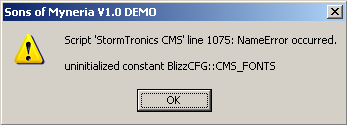


          def get_skin_and_font
              @font_name = $game_system.fontname
LINE1075==> @current_font = BlizzCFG::CMS_FONTS.index(@font_name)
              @skin_name = $game_system.windowskin_name
              self.current_skin = BlizzCFG::CMS_SKINS.index(@skin_name)
            end

My font config in the cms script is as followed:

FONTS = ['Arial', 'Comic Sans MS', 'Tahoma', 'Times New Roman']

which worked fine in the old version so i got no clue what the problem is, i hate to keep bugging you like this but your scripts are very good and i would at least like to get my game up to the "playable" state

Don't double post within 24 hours. :P

Juan

That error means theres not a module called Blizz_CFG
Check if theres  a Blizz:CFG in the begining of the cms.
Dropbox Who need luck when you can make your own.
3ds Friend code: ShowHide
 4468 1422  6617

Mightylink

October 13, 2008, 08:47:33 am #4 Last Edit: October 13, 2008, 08:49:25 am by Mightylink
thanks, i found the problem, blizzard changed the values of the config from FONTS = to CMS_FONTS = , i copied the entire block from the old config when i should of just copied the fonts

looks like everythings working now, thanks guys for everything, and btw i like the extra options in the new version like changing the names of the battle menu, i prefer to call it Summons instead of Chaos Drive :P

keep up the great work blizzard

Blizzard

I was just going to post what you said how to fix it. xD
Check out our game brands:

Daygames
Game Night Games
Chugnar Games

Quote from: winkioI do not speak to bricks, either as individuals or in wall form.

Quote from: Barney StinsonWhen I get sad, I stop being sad and be awesome instead. True story.