[XP] Blizz-ABS

Started by Blizzard, January 09, 2008, 08:21:56 am

Previous topic - Next topic

Blizzard

Quote from: SRS Siege on January 03, 2010, 11:04:15 pm
Any ideas on?:
1)Increasing damage with better consuming items (ie. A bow can both shoot "wood arrows" and "steel arrows," what would be the insentive of using the more exspensive steel arrows over the cheap wood arrows?)
2)Matching Armor set bonuses (ie. Having a full set of "iron armor" would give you a bonus to certain skills, like in Dragon Age: Origons)


1. Set up your items. That has nothing to do with Blizz-ABS.

2. I think I saw a script for that recently. Or at least somebody requested it.
Check out Daygames and our games:

King of Booze 2      King of Booze: Never Ever
Drinking Game for Android      Never have I ever for Android
Drinking Game for iOS      Never have I ever for iOS


Quote from: winkioI do not speak to bricks, either as individuals or in wall form.

Quote from: Barney StinsonWhen I get sad, I stop being sad and be awesome instead. True story.

SRS Siege

Quote1. Set up your items. That has nothing to do with Blizz-ABS.

Sorry, I thought it would have something to do with Blizz-ABS. Just make the arrows recover negative HP or something?

Quote2. I think I saw a script for that recently. Or at least somebody requested it.

Ok, I'll look for it.

Blizzard

Check out Daygames and our games:

King of Booze 2      King of Booze: Never Ever
Drinking Game for Android      Never have I ever for Android
Drinking Game for iOS      Never have I ever for iOS


Quote from: winkioI do not speak to bricks, either as individuals or in wall form.

Quote from: Barney StinsonWhen I get sad, I stop being sad and be awesome instead. True story.

RoseSkye

Is there anyway to have an ally corpse or something besides the transparent dead ally following you o.o

legacyblade

That's a good idea Rose. It'd be cool to be able to have a wisp or a coffin or something to represent dead allies.

winkio

or corpses that you have to use an item/skill on to revive them

legacyblade

That too. Their corpse would stay put unless you revived it. (not sure how it would work with being able to leave the map though)

Sin86

I got an error and I tried to enable and disable intelligent passability but it doesn't work.


Script 'Blizz 2' line 4704: NameError occurred.

uninitialized constant BlizzABS::Config::INTELLIGENT_PASSABILITY

legacyblade

(I get that error, but only if I paste the blizzABS scripts in a new project O.o)

RoseSkye

Quote from: legacyblade on January 04, 2010, 08:45:52 pm
That too. Their corpse would stay put unless you revived it. (not sure how it would work with being able to leave the map though)


It'd work perfectly for me since my game works in stages instead of RPG ... well one of them at least.  If you leave the map you'll lose the ally for that level/ mission. However, for rpg's I suppose you can always recover the ally at an inn or something.

winkio

yeah, just keep track of map id and position, it's not that bad.  And yeah, like Rose said, some way to get them back at towns.

Blizzard

I think you guys should do that with events. :P

Quote from: Sin86 on January 04, 2010, 09:26:19 pm
I got an error and I tried to enable and disable intelligent passability but it doesn't work.


Script 'Blizz 2' line 4704: NameError occurred.

uninitialized constant BlizzABS::Config::INTELLIGENT_PASSABILITY


Try redownloading. I uploaded the script again.
Check out Daygames and our games:

King of Booze 2      King of Booze: Never Ever
Drinking Game for Android      Never have I ever for Android
Drinking Game for iOS      Never have I ever for iOS


Quote from: winkioI do not speak to bricks, either as individuals or in wall form.

Quote from: Barney StinsonWhen I get sad, I stop being sad and be awesome instead. True story.

RoseSkye

Hmm it may be doable... somewhat but I have no idea how to save position of a caterpillar event or even disable showing a caterpillar event. Any pointers?

Sin86

Quote from: Blizzard on January 05, 2010, 07:00:13 am
I think you guys should do that with events. :P

Quote from: Sin86 on January 04, 2010, 09:26:19 pm
I got an error and I tried to enable and disable intelligent passability but it doesn't work.


Script 'Blizz 2' line 4704: NameError occurred.

uninitialized constant BlizzABS::Config::INTELLIGENT_PASSABILITY


Try redownloading. I uploaded the script again.


I fixed it. It was suppose to say "PASSABILTY" rather than "PASSABILITY"(notice that there is an I after the L, that I shouldn't be there). Look for another line where it says "PASSABILITY" and change it to "PASSABILTY". It should fix it. All of this is on script 2.

Aqua

The 'right' spelling of the word is "Passability" with the I after the L XD

I say 'right' because it's not a /real/ word... but it's a juxtaposition of "passable" and "ability"

Lolz

Jaar

Hey, I've gotta say this is a nice script ^^. I've used the previous versions of it and some other ABSs...so far the Blizz-ABS is the best ABS yet.

However, I have encountered a bug (I think) when I try to run the game. It opens fine, but when I get into the map the system gives me an error and shuts down.

Here is a screen:
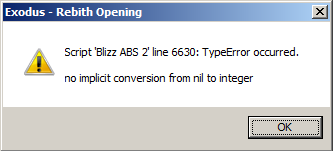

Here is the snippet of code that it says is mucking up:
 #----------------------------------------------------------------------------
  # trigger?
  #  Test if key was triggered once.
  #----------------------------------------------------------------------------
  def Input.trigger?(keys)
    keys = [keys] unless keys.is_a?(Array) [Not code]This was the line it mentioned[/Not code]
    return keys.any? {|key| @triggered[key]}
  end


So far I've assumed that this is being caused by some mistake I did in the Key configuration, but I've looked at it closely and haven't been able to identify anything wrong with it.
Here is a screen of my controls:
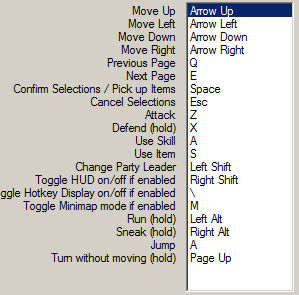

I've looked around the rest of the configuration options, but I don't see anything strange- infact, I've left almost all of them default except for the fact I disabled the Minimap, turned on damage bounce, and turned on Intelligent Passability - which was previously giving me an error, but I did as Sin86 did and it worked fine.

So yeah. I'm I just doing something stupid and careless that I can't point out XD? Am I posting this in the right place? I would be much obliged for your help! ^^

Thanks ahead of time!

Aqua

You have a button input check at the VERY beginning of the game.

The event needs at least a 1 frame wait before it can check for any button input or else it'll crash.
Just go to your button input check event and add a wait.

(I don't know why it does it... I just know the solution :x)

Jaar

January 05, 2010, 10:29:08 pm #2937 Last Edit: January 05, 2010, 11:43:54 pm by Jaar
Heh...I'm going to sound like a complete newb when I say this, but how do I do that? Do you mean I have a Button Input event currently set up? Do you mean to put one up? If it is the first, I've checked several times and I don't have any button input events.

Sorry, I'm kinda thick when it comes to this stuff @_@... so yeah. Thanks for the help anyway ^^.

EDIT: Ah-HA! Figured it out! Ended up adding a couple extra lines by copying it wrong >.<... Thanks for the help anyway, Aqua! I have to keep in mind what you said about the "Input Checks" for future use ^^.

Blizzard

@Sin86: No, it's supposed to say PASSABILITY in the config. You didn't regenerate your configuration after upgrading.
Check out Daygames and our games:

King of Booze 2      King of Booze: Never Ever
Drinking Game for Android      Never have I ever for Android
Drinking Game for iOS      Never have I ever for iOS


Quote from: winkioI do not speak to bricks, either as individuals or in wall form.

Quote from: Barney StinsonWhen I get sad, I stop being sad and be awesome instead. True story.

RoseSkye

Quote from: Blizzard on January 06, 2010, 05:05:28 am
@Sin86: No, it's supposed to say PASSABILITY in the config. You didn't regenerate your configuration after upgrading.

I can't use script calls to control party member's aggressive/passive behavior.