So while I was updating my
Bestiary Script, I ran into this error while I was trying to create a
way into text files into my code.
module ACE
	module Bestiary
		def self.get_text(mode, file_id)
			# Opens a text document, makes an array whose elements consist of the

lines
			# of the document, and returns it.
			case mode
			when 0 then filename = "Data/Bio/#{file_id}.txt"
			when 1 then filename = "Data/Battle/#{file_id}.txt"
			end
			begin
				file = File.open(filename, 'r')
			rescue
				case mode
				when 0 then return 'A fearsome foe'
				when 1 then return 'No battle data found'
				end
			end
			book = []
			file.each_line {|line| book << line}
			file.close
			return book
		end
	end
end
As you see in this code, its function is to open text files in either the Bio or Battle folders
and if the file doesn't exist, then it would print the strings instead.
class Window_BestiaryStatus < Window_Base
	def draw_enemy_bio
		refresh
		unless $game_album.enemy_blacklisted?(@enemy.id)
			2.times {|i| draw_horz_line(15+(i*200),self.width)}
			self.contents.font.color, self.contents.font.size = system_color, 20
			self.contents.draw_text(x=4, 25, self.width, 32, ALBUM_VOCAB

[:biography], 0)
			self.contents.draw_text(x, 225, self.width, 32, ALBUM_VOCAB[:tactics],

0)
			draw_bio_info(x, 50, normal_color)
			draw_ability_info(x, 250, normal_color)
		else
			draw_horz_line(15, self.width)
			fontsize = self.contents.font.size = 50
			self.contents.draw_text(0, 64, 600, fontsize, BLACKLIST_QUOTE)
		end
	end
	def draw_bio_info(x, y, color)
		contents.font.color, contents.font.size = color, 18
		text = contents.slice_text(ACE::Bestiary.get_text(0, @enemy.id), 588)
		text.each_index {|i| contents.draw_text(x, (y)+i*20, 604, 32, text[i],

BIO_ALIGN)}
	end
	def draw_ability_info(x, y, color)
		contents.font.color, contents.font.size = color, 18
		text = contents.slice_text(ACE::Bestiary.get_text(1, @enemy.id), 588)
		text.each_index {|i| contents.draw_text(x, (y)+i*20, 604, 32, text[i],

SKILL_ALIGN)}
	end
end
This script is where the get_text goes to from the module above. Here it's supposed to input
the opened text file and display it on the screen from methods draw_bio_info and
draw_ability_info. The error is coming from the Bitmap.slice_text message which I'm about to
get to.
class Bitmap
  #~~~~~~~~~~~~~~~~~~~~~~~~~~~~~~~~~~~~~~~~~~~~~~~~~~~~~~~~~~~~~~~~~~~~~~~~~~
	# * Slice Text Method
	# Author: Blizzard
	#~~~~~~~~~~~~~~~~~~~~~~~~~~~~~~~~~~~~~~~~~~~~~~~~~~~~~~~~~~~~~~~~~~~~~~~~~~
	def slice_text(text, width)
		words = text.split(' ')
		return words if words.size == 1
		result, current_text = [], words.shift
		words.each_index do |i|
			if self.text_size("#{current_text} #{words[i]}").width > width
				result << current_text
				current_text = words[i]
			else current_text = "#{current_text} #{words[i]}"
			end
			result << current_text if i >= words.size - 1
		end
		return result
	end
end
This script is blizzards slice_text method, where it breaks the paragraph to new lines, and
this is where the error is coming from.
Okay for the actually issue, for some reason whenever I try to get the script to open a text file I get this error.
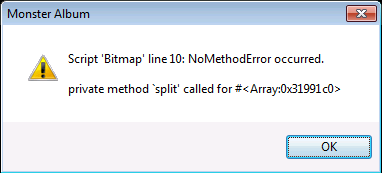
However, if I was just to input a string, I don't get this error. I'm most likely doing something wrong with the input, but I can't really tell, so I need another set of eyes to show me how to fix this error that might just be pretty obvious.
If anymore info is need I'll post it.